RankTalon falcon logoRankTalon
ProductSEO AuditGoogle ReviewsVisual IdentityAI ContentSocial SchedulingIntegrationsBlog AgentGetting startedAboutCase studiesContactPricing
Log inGet started
  1. Home
  2. /
  3. Social Scheduling

SOCIAL MEDIA SCHEDULING · RANKTALON CALENDAR

Plan social posts with a clear review step.

Prepare channel-specific content, check its destination, then choose whether to keep it as a draft, set a time, or publish when the action is available.

Open your Calendar ›Read the Getting started guide

Sign in to access the protected Calendar. This public page does not connect accounts or publish posts.

SOCIAL-POST DESTINATIONS

  • Facebook
  • Instagram
  • Google Business Profile

Available actions depend on the connected account and post type.

ONE CALENDAR · TWO VIEWS

A familiar view on desktop and mobile

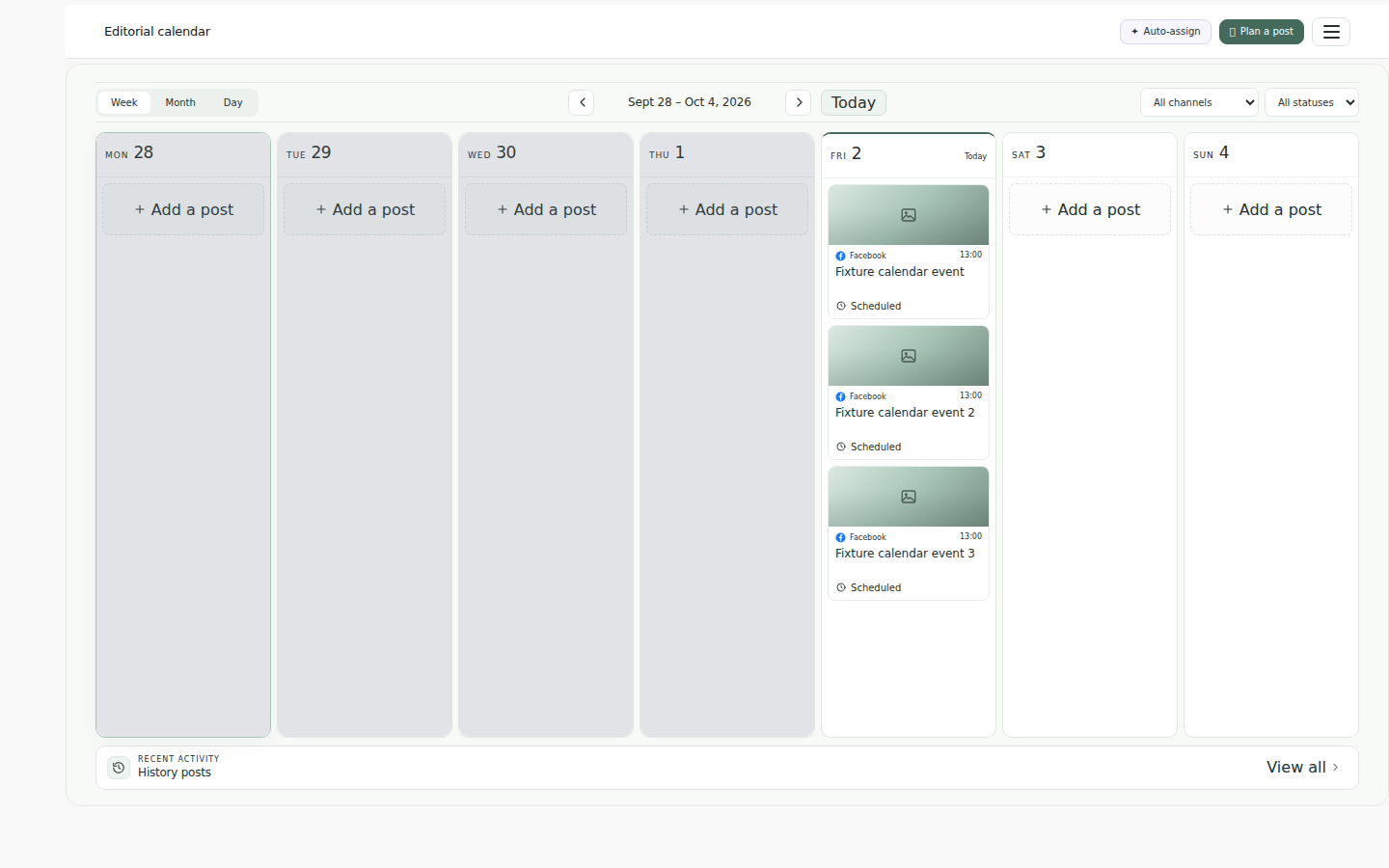
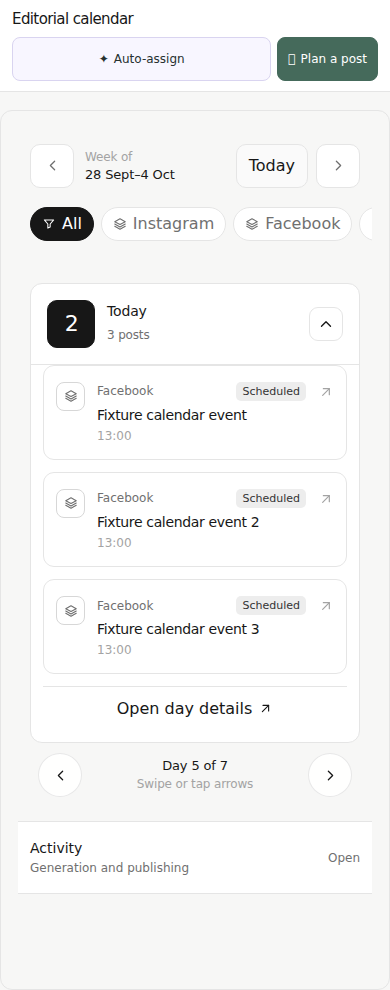
These captures show the current Calendar components with the same fictional date and sample entries. They are not connected to a customer workspace.

Desktop · ClassicSample content · not connected
Desktop Classic Calendar showing fictional sample posts for 2 October 2026. Not a connected workspace.
Mobile · Single-daySame sample date and posts · not connected
Mobile Single-day Calendar showing the same fictional sample posts for 2 October 2026 as the desktop view. Not a connected workspace.

YOUR REVIEW, YOUR NEXT STEP

From draft to a planned post

The Calendar brings the work together without treating a draft as a published post.

  1. 01

    Prepare a post

    Start with a channel-specific draft in the Calendar, or keep existing work as a draft while you make changes.

  2. 02

    Review the details

    Check the content, destination and timing. Available actions depend on the connected account and post type.

  3. 03

    Choose what happens next

    Leave the post as a draft, schedule it, or publish it when that action is available for the destination.

CHANNELS, STATUS & TIMING

Know what each Calendar detail means

Social-post destinations

RankTalon supports social posts for Facebook, Instagram and Google Business Profile. What you can do depends on the connected account and post type.

WordPress and Agent Site are destinations for the separate Blog Agent article workflow, not ordinary social posts.

Calendar statuses

Draft
Content is prepared but has not been scheduled or published.
Scheduled
A time has been set for a future publishing attempt.
Published
The Calendar records a successful publishing action; destination availability can still change.
Error
The action needs attention. Check the destination and account before deciding what to do next.

Time zones

Manually scheduled times are entered in your browser’s local time zone. An automatic schedule uses the time zone saved with that schedule. Calendar timestamps are displayed in your browser’s local time zone.

Reels availability is conditional

Reels use a separate workspace with administrator and onboarding checks. Provider credentials, site Reels Settings and per-user usage limits also apply. Production availability and account entitlement have not been confirmed for every customer.

REVIEW BEFORE YOU PUBLISH

Keep every next step visible.

Open the protected Calendar to work with your connected destinations and schedule.

Open your Calendar ›Read the Getting started guide
RankTalon falcon logoRankTalon

SEO, content and publishing in one intelligent workspace.

TrustpilotFacebook0330 043 0172
Privacy PolicyTerms & ConditionsBlog AgentGetting startedAboutCase studiesContactPricing